Frequently Asked Questions
Installation
Downloads
-
Download the C-17A
Current Development Version
Click on the
deltasimulations-c17.zipfile to download -
Download the UH-60M
Current Development Version
Click on the
deltasimulations-uh60.zipfile to download
Please follow ALL steps in this section if you encounter any issues with installation before seeking support.
Open and extract the zip that you downloaded from one of the links above, and drag the deltasimulations-XXX folder inside the zip into your Community folder.
See below for the location of your Community folder.
Community Folder
Microsoft Store and/or Game Pass Edition
- Copy the
deltasimulations-XXXfolder into your community package folder.
It is located in:
C:\Users\[YOURUSERNAME]\AppData\Local\Packages\Microsoft.FlightSimulator_<RANDOMLETTERS>\LocalCache\Packages\Community.
Steam Edition
- Copy the
deltasimulations-XXXfolder into your community package folder.
It is located in:
C:\Users\[YOUR USERNAME]\AppData\Roaming\Microsoft Flight Simulator\Packages\Community.
Boxed Edition
- Copy the
deltasimulations-XXXfolder into your community package folder.
It is located in:
C:\Users\[YOUR USERNAME]\AppData\Local\MSFSPackages\Community.
Troubleshooting
If the above methods do not work:
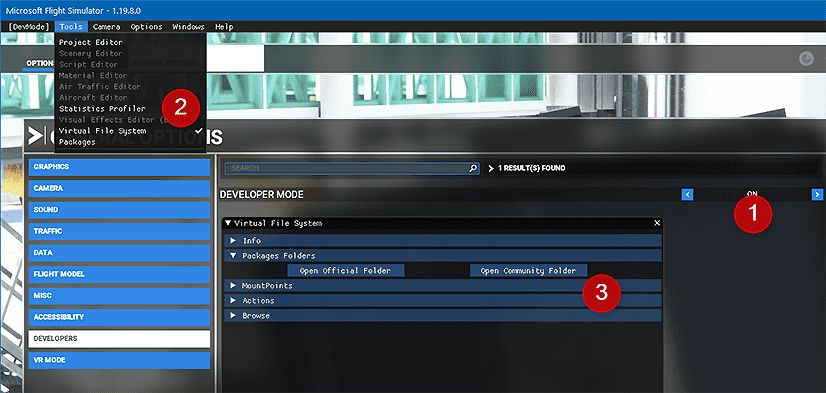 To find the Community folder that MSFS is using, please follow these steps:
- Go to your General Settings in MSFS and activate Developer Mode.
- Go to the menu and select 'Virtual File System'.
- Click on 'Packages Folders' and select 'Open Community Folder'. This opens the Community folder in a Windows Explorer. Please ensure that your add-ons are installed in the folder that is opened.
Clean Install
If you would like to manually perform a clean install you have to delete the deltasimulations-XXX folder from your community folder.
How do I report an issue?
CHECK THIS FIRST
Before Reporting Issues
Please try removing all other mods/liveries from the community folder and test our add-on again. We also reccomend doing a clean install. This will help rule out conflicts.
Most reported issues are caused by conflicts with other mods and liveries, or from an incorrect installation. If this does not resolve your issue, please continue below.
We highly recommend joining Our Discord for the fastest response time. Alternatively, please submit a Github Issue on the relevant repo containing the aircraft version, simulator version, and specific, reproducible steps to achieve this issue. Please be as specific as possible.
How Can I Support Development?
If you are looking to assist with the development, you can start immediately with a PR or fork on our Github, though we highly recommend first filling out our Team Application Form so we can onboard you onto our server, and you can gain access to our reference libraries.
As a freeware organization, we rely on self-funding to cover the software, equipment, and subscriptions required to develop our projects. After years of development and thousands of dollars personally invested, we’re working to make the group more sustainable for the long term.
Donations are the most effective way to support our work if you are not a developer:
Supporters receive a special role on our Discord server along with sneak peeks and additional updates on our development progress. If you donate, please contact a moderator on Discord with proof of donation to receive your role.
Please note: donations do not provide early access to any of our projects — only additional development updates and behind-the-scenes information.
Will These Projects Be Available on Xbox?
These projects are PC-only at this time, and will remain so for the foreseable future.
When I Click a Button/Test, It Doesn't Work as it Should
Our aircraft code runs on the PC-based XML scripting which is much easier to debug and adapt for complex aircraft. As a result, you may run into interaction issues when using the XBOX/LOCK control modes. We design our aircraft for use in the LEGACY control mode
Are These Projects Free?
Yes! This is the heart of our philosophy - our aircrafts will forever be free, open-source, and available to all. We will never gatekeep products behind paywalls or limited access. What you see is what you get.
When is the Next Update?
We are a team of volunteers developing in our free time and are thus unable to provide an estimate for a release date. We believe in releasing "beta" test builds of our aircraft, allowing for an effective feedback loop. When we believe we have a stable enough build, we will post it in our Discord, and it will be available on Github under the aircraft's releases. Then, you can follow our download instructions available above.